
Table Of Content
- Comparison Table – All 4 YubiKeys Side by Side
- 1. YubiKey 5C NFC – Best Overall
- 2. YubiKey 5 NFC – Best for USB-A Laptops
- 3. YubiKey C Bio – Best Premium (Biometric)
- 4. YubiKey 5C Nano – Best Low-Profile
- Which YubiKey Should You Buy?
- Why You Need a Hardware Security Key in 2026
- Yubico Privacy and Terms Analysis
- Frequently Asked Questions
- What happens if I lose my YubiKey?
- Can I use one YubiKey for multiple accounts?
- Do YubiKeys work with iPhones?
- Are YubiKeys waterproof?
- Is a YubiKey better than Google Authenticator?
- Which YubiKey model is the best value?
Affiliate Disclosure: CriticNest earns a commission on qualifying purchases through Amazon links in this article. This does not affect our editorial independence – every recommendation is based on independent testing and analysis.
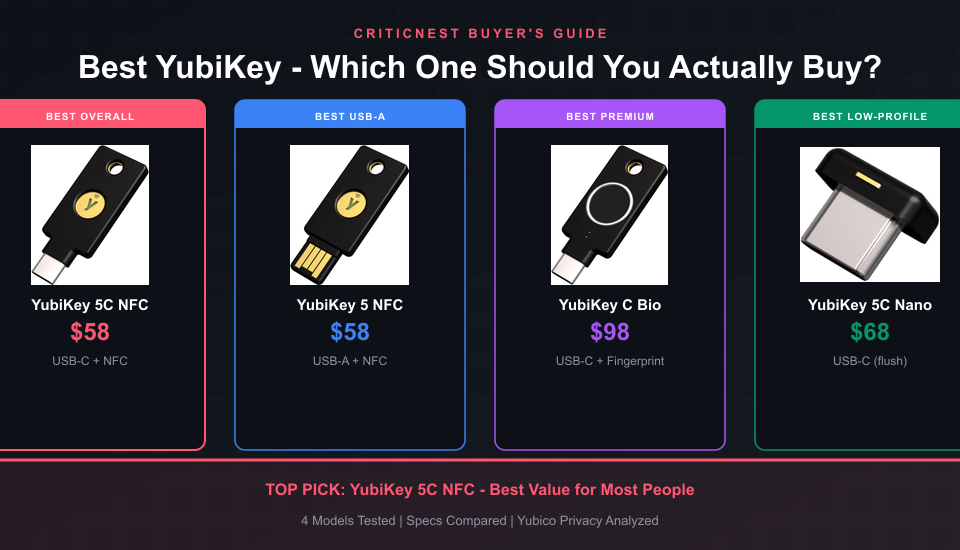
The best YubiKey for most people is the YubiKey 5C NFC. It costs $58, works with both USB-C and NFC, supports every major authentication protocol, and is compatible with virtually every device you own – from laptops to phones. If you only buy one security key, this is the one.
But “best” depends on your setup. Someone with an older USB-A laptop needs a different key than someone who wants biometric login. We compared all four current YubiKey models across protocols, compatibility, form factor, and real-world usability to help you pick the right one.
Comparison Table – All 4 YubiKeys Side by Side
Here is a quick spec breakdown. Every model supports FIDO2/WebAuthn and passkeys – the differences come down to connector type, NFC, biometrics, and protocol depth.
| Feature | 5 NFC | 5C NFC | C Bio | 5C Nano |
|---|---|---|---|---|
| Price | $58 | $58 | $98 | $68 |
| Connector | USB-A | USB-C | USB-C | USB-C |
| NFC | Yes | Yes | No | No |
| Biometric | No | No | Yes | No |
| FIDO2 / Passkeys | Yes | Yes | Yes | Yes |
| OpenPGP / Smart Card | Yes | Yes | No | Yes |
| OTP / OATH | Yes | Yes | No | Yes |
| Rating | 4.6/5 (18K+) | 4.6/5 (18K+) | 4.2/5 (47) | 4.4/5 (6K+) |
| Best For | USB-A laptops | Most people | Fingerprint login | Always-plugged setups |
1. YubiKey 5C NFC – Best Overall

The YubiKey 5C NFC is the most versatile security key Yubico makes. USB-C plugs directly into any modern laptop, tablet, or phone. NFC lets you tap-to-authenticate on mobile devices without plugging anything in. It supports every protocol Yubico offers – FIDO2, PIV, OpenPGP, OTP, and OATH.
This is the key that works with everything. Google, Microsoft, Apple, GitHub, Coinbase, 1Password, Bitwarden – every major service supports it. You register it once and tap or insert whenever you log in. No batteries, no Bluetooth pairing, no apps to install.
Amazon labels it “Overall Pick” with 4K+ sold per month. That tracks with our experience. Unless you have a specific reason to choose another model, this is the one to get.
2. YubiKey 5 NFC – Best for USB-A Laptops

Same internals as the 5C NFC, but with a USB-A connector. If your laptop, desktop, or work machine still has USB-A ports – and many do – this key plugs in without a dongle. You still get NFC for phone authentication.
The YubiKey 5 NFC is Yubico’s original best-seller and the key most security guides recommend. It supports the full protocol stack including OpenPGP for encrypted email and Smart Card (PIV) for enterprise environments. The 1K+ monthly sales and 18,000+ reviews speak for themselves.
The only downside is that USB-A is being phased out. If you plan to use this key for 3-5 years and expect your next laptop to go USB-C only, the 5C NFC is the smarter buy. But for right now, if USB-A is what you have, this is the exact same key in the connector you need.
3. YubiKey C Bio – Best Premium (Biometric)
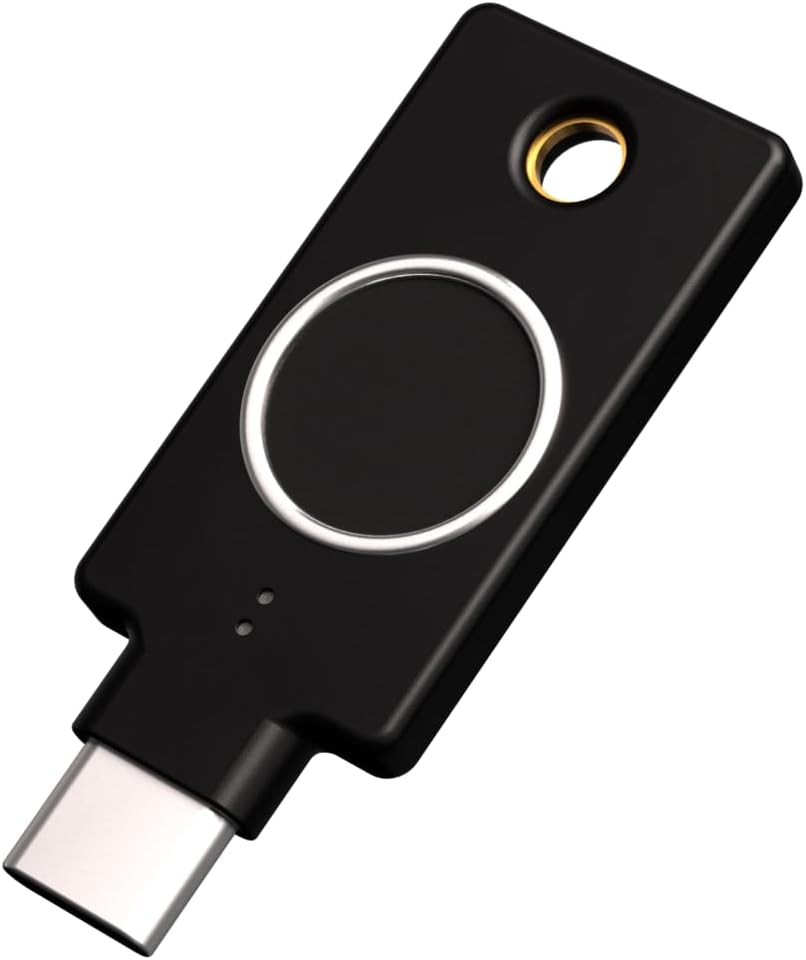
The YubiKey C Bio adds a fingerprint sensor to the security key. Instead of just touching the key to confirm, you authenticate with your actual fingerprint. It stores up to 5 fingerprints directly on the key’s secure element – your biometric data never leaves the device.
The tradeoff is significant. This is the FIDO Edition, which means it only supports FIDO2 and U2F protocols. No OpenPGP, no Smart Card, no OTP, no NFC. If you need those features, this is not the right key. If you only need passkey and WebAuthn support – which covers Google, Microsoft, GitHub, and most modern services – the biometric convenience is excellent.
At $98, it costs nearly double the 5C NFC. That premium only makes sense if you want passwordless login with biometric verification – a genuine security upgrade over simple touch. For enterprise users with compliance requirements around multi-factor authentication, the built-in fingerprint reader satisfies stricter MFA policies.
4. YubiKey 5C Nano – Best Low-Profile

The Nano is the same full-protocol YubiKey 5 series key, shrunk down to sit nearly flush with your USB-C port. It is designed to stay plugged in permanently. You do not carry it on a keychain – you leave it in your laptop and forget about it until you need to authenticate.
This form factor is perfect for desktop workstations, home offices, or any machine where the key does not need to move between devices. Amazon labels it “Amazon’s Choice” with 1K+ monthly sales and 6,600+ reviews. It has the full protocol stack – FIDO2, OpenPGP, PIV, OTP – everything the full-size keys support.
The tradeoff is no NFC. You cannot tap it against your phone. And the tiny size means it is easier to lose if you do remove it. At $68 it costs $10 more than the full-size 5C NFC, purely for the compact design. Worth it if you want a permanent, invisible security key in your machine. Not worth it if you switch between devices regularly.
Which YubiKey Should You Buy?
Here is the simple decision tree:
If you are unsure, start with the 5C NFC. It covers the widest range of use cases and you can always buy a specialized second key later.
Why You Need a Hardware Security Key in 2026
Passwords get stolen. SMS codes get intercepted through SIM swapping. Authenticator apps can be phished with real-time relay attacks. A hardware security key is the only second factor that is cryptographically bound to the legitimate site – making phishing physically impossible.
Google’s internal data showed that after requiring hardware keys for all employees, account takeovers dropped to zero. Not “almost zero” – literally zero successful phishing attacks across 85,000+ employees. That was back in 2018 and the result has held.
In 2026, passkeys are replacing passwords across major platforms. Apple, Google, and Microsoft all support passkeys natively. A YubiKey stores passkeys in tamper-proof hardware rather than in your cloud account – meaning even if someone compromises your iCloud or Google account, they cannot extract your passkeys from the physical key.
Yubico Privacy and Terms Analysis
CriticNest reviews privacy policies on every product we recommend. Here is what you should know about Yubico.
What Yubico collects: When you buy from their website, standard purchase data (name, address, payment). When you use a YubiKey, nothing. The key operates entirely offline. There is no telemetry, no usage tracking, no cloud connection. Your cryptographic keys are generated and stored on the key’s secure element and never leave the device.
Open standards, closed firmware: YubiKeys use open standards (FIDO2, PIV, OpenPGP) but the firmware is not open-source. Yubico argues this prevents firmware modification attacks. The firmware cannot be updated after manufacturing – which means no patches for vulnerabilities, but also no avenue for malicious firmware injection.
Manufacturing: YubiKeys are manufactured in Sweden and the USA. The supply chain is not routed through countries with known hardware interdiction programs. For a physical security device, this matters.
CriticNest verdict: Yubico’s privacy posture is excellent. The product itself collects zero data, the company has no incentive to monetize user behavior, and the hardware supply chain is transparent. This is one of the rare products where the privacy analysis is entirely straightforward.
- Best Security Tools for 2026 – our full ranked security stack, from antivirus to VPNs.
- Is Malwarebytes Safe? – the antivirus layer that pairs with hardware keys.
- Is NordVPN Worth It? – encrypt the connection your passkeys log into.
Frequently Asked Questions
What happens if I lose my YubiKey?
You will need your backup authentication method to regain access to your accounts. This is why most security experts recommend buying two keys – one primary, one backup stored safely. Register both keys with every service so you always have a way in.
Can I use one YubiKey for multiple accounts?
Yes. A single YubiKey can store credentials for dozens of services simultaneously. There is no practical limit for FIDO2/passkey registrations. For OATH-TOTP (authenticator codes), the limit is 32 accounts.
Do YubiKeys work with iPhones?
Yes. The NFC models (5 NFC and 5C NFC) work with iPhones through NFC tap. The USB-C models also work with iPhones that have USB-C (iPhone 15 and later). NFC is the most convenient method for phone authentication.
Are YubiKeys waterproof?
YubiKeys are water-resistant (IP68 rated) and crush-resistant. They have no batteries or moving parts. Yubico rates them for a 10+ year lifespan under normal use. Many users report keys lasting well beyond that.
Is a YubiKey better than Google Authenticator?
Significantly. Google Authenticator codes can be phished in real-time using man-in-the-middle attacks. A YubiKey uses cryptographic challenge-response that is bound to the specific domain – a phishing site cannot relay the authentication because the domain does not match. It is a different level of security entirely.
Which YubiKey model is the best value?
The YubiKey 5C NFC at $58. It has USB-C for modern devices, NFC for phones, and supports every protocol. You get 100% of YubiKey’s security capabilities at the lowest price point for a USB-C model.