
Table Of Content
- What Elementor Free Can Do with WooCommerce
- What Elementor Pro Unlocks for WooCommerce
- Theme Builder – The Core Feature
- WooCommerce Widgets (Pro Only)
- Popup Builder for Sales
- Custom CSS Per Widget
- Elementor Pro Pricing for WooCommerce Stores
- When You Do NOT Need Elementor Pro
- My Experience Building WooCommerce Stores with Elementor
- Elementor Pro Privacy and Terms Analysis
- Frequently Asked Questions
- Can I use WooCommerce with Elementor Free?
- Which Elementor Pro plan is best for WooCommerce?
- Can Elementor Pro replace WooCommerce plugins like CartFlows?
- Does Elementor Pro slow down WooCommerce?
- Is Elementor Pro better than Divi for WooCommerce?
- Can I try Elementor Pro and get a refund if it does not work for me?
Affiliate Disclosure: CriticNest earns a commission if you purchase through links in this article. This does not affect our editorial independence – every recommendation is based on hands-on testing.
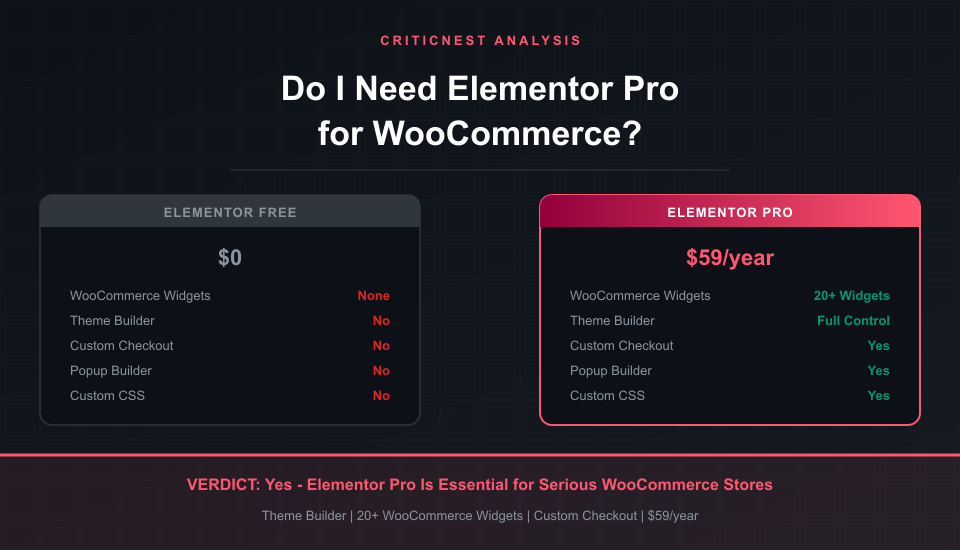
Yes, you need Elementor Pro for WooCommerce if you want full control over your product pages, checkout flow, and store design. The free version works with WooCommerce technically, but it locks you out of the 20+ WooCommerce-specific widgets, Theme Builder, and custom checkout templates that make the difference between a generic store and one that actually converts.
I build WooCommerce stores with Elementor for clients on a weekly basis. After years of hands-on work, the answer is clear: Elementor Free gets you a functional store. Elementor Pro gets you a store that sells. Here is exactly what you get and what you miss at each tier.
What Elementor Free Can Do with WooCommerce
Elementor Free is compatible with WooCommerce. You can install both plugins, and WooCommerce will generate its default product pages, cart, and checkout. You can use Elementor’s free widgets to design other pages on your site – homepage, about, contact.
But here is the limitation: Elementor Free cannot touch WooCommerce’s core pages. You cannot redesign your product page layout. You cannot customize the cart or checkout. You cannot add product grids with custom styling to your homepage. WooCommerce renders its pages using your theme’s templates, and Elementor Free has no way to override them.
This means your store pages will look like whatever your WordPress theme defaults to. If you picked a theme with decent WooCommerce templates, it might look acceptable. If you did not, your product pages will feel disconnected from the rest of your site.
- Basic page builder for non-store pages (homepage, about, landing pages)
- WooCommerce runs normally using your theme’s default templates
- Standard widgets (text, image, button, columns, spacer)
- Mobile responsive editing
What Elementor Pro Unlocks for WooCommerce
This is where the real value is. Elementor Pro gives you 20+ WooCommerce-specific widgets plus the Theme Builder, which lets you design every WooCommerce template visually.
Theme Builder – The Core Feature
Theme Builder lets you create custom templates for single product pages, product archives, cart, checkout, and my account pages. You design them with Elementor’s drag-and-drop editor, and WooCommerce uses your custom templates instead of the theme defaults. This is the single biggest reason to upgrade.
Without Theme Builder, you are stuck with whatever layout your theme provides. With it, you control every pixel of your store’s customer-facing pages.
WooCommerce Widgets (Pro Only)
Elementor Pro adds dedicated WooCommerce widgets that pull live product data:
| Widget | What It Does | Free | Pro |
|---|---|---|---|
| Product Images | Gallery with zoom, lightbox | No | Yes |
| Add to Cart | Custom styled buy button | No | Yes |
| Product Price | Dynamic price with sale styling | No | Yes |
| Products Grid | Display products anywhere | No | Yes |
| Product Categories | Visual category cards | No | Yes |
| Custom Checkout | Redesign the entire checkout | No | Yes |
| My Account Page | Custom account dashboard | No | Yes |
| Product Reviews | Styled customer reviews | No | Yes |
| Upsells / Cross-sells | Related products section | No | Yes |
| Custom CSS | Per-widget CSS overrides | No | Yes |
Popup Builder for Sales
Pro includes a Popup Builder that integrates with WooCommerce conditions. You can trigger popups based on cart value, product category, or user status. Exit-intent popups with discount codes, cart abandonment reminders, first-time visitor offers – all built visually without a separate popup plugin.
Custom CSS Per Widget
Free Elementor has no custom CSS option. Pro lets you add CSS to any individual widget. For WooCommerce stores, this means fine-tuning product card hover effects, checkout button styles, and sale badge positioning without touching your theme files.
Elementor Pro Pricing for WooCommerce Stores
Elementor Pro starts at $59/year for a single site. Here is how the plans compare for WooCommerce users:
| Plan | Price/Year | Sites | WooCommerce Features |
|---|---|---|---|
| Essential | $59 | 1 | All Pro widgets + Theme Builder |
| Advanced | $99 | 3 | Same + priority support |
| Expert | $199 | 25 | Same + expert profile |
For a single WooCommerce store, the Essential plan at $59/year is the right choice. That is less than $5/month for full control over every page of your store. Every plan includes the same WooCommerce widgets and Theme Builder – the only difference is how many sites you can activate it on.
Try Elementor Pro for WooCommerce
When You Do NOT Need Elementor Pro
Elementor Pro is not always necessary. Here are the cases where the free version is enough:
- Simple product catalog with no checkout – If you are just displaying products with external buy links (like affiliate links), you do not need WooCommerce widgets. Elementor Free can handle static product displays.
- Your theme has good WooCommerce templates – Themes like Astra, Kadence, and Flavflavor come with polished WooCommerce templates. If you are happy with the default look, you might not need Theme Builder.
- You are testing a product idea – If you are validating whether a product sells before investing in design, Elementor Free plus WooCommerce defaults is fine for an MVP.
- You are only using WooCommerce for digital downloads – Simple digital product stores with minimal design needs can work without Pro.
My Experience Building WooCommerce Stores with Elementor
I have built and managed WooCommerce stores for clients across medical practices, legal firms, and e-commerce businesses using Elementor Pro. The features I use most are Theme Builder for custom product page layouts, the Products Grid widget for homepage featured products, and the Checkout widget for streamlined conversion flows.
The biggest impact I have seen is on checkout pages. WooCommerce’s default checkout is functional but cluttered. With Elementor Pro, I strip it down to the essentials, match the store’s branding, and consistently see checkout completion rates improve. That alone pays for the $59/year license many times over for any store doing real volume.
For context, I also use Elementor alongside tools like Yoast SEO for on-page optimization and Cloudflare for performance. Elementor Pro plays well with the broader WordPress ecosystem – it does not lock you into a proprietary stack.
Elementor Pro Privacy and Terms Analysis
CriticNest reviews the privacy posture of every product we recommend.
Data collection: Elementor collects usage statistics if you opt in during setup. This includes anonymized data about which widgets and features you use. You can disable this entirely in Settings > Elementor > Usage Data. When opted out, Elementor sends zero telemetry.
Hosting option: Elementor now offers its own hosting (powered by Google Cloud). If you use Elementor Hosting, your site data lives on Google Cloud infrastructure with standard data processing terms. If you self-host WordPress and just use the Elementor plugin, your data stays entirely on your own server.
License terms: Your Pro license includes 1 year of updates and support. If you do not renew, the plugin continues to work – you just stop receiving updates and new features. Elementor does not remotely disable Pro features on non-renewed licenses.
CriticNest verdict: Clean privacy posture. Opt-in telemetry only, no forced data collection, and the plugin works offline without phoning home. The licensing terms are fair – no hostage-ware tactics if you stop paying.
Publishing 50 posts through wp-admin takes days. This site does it differently.
CriticNest posts ship through a REST publishing pipeline driven by Claude Code: queue planning, AI drafting, validation gates built from real production failures, and live verification of every published page. I packaged that exact system so it runs on any WordPress site.
See the WordPress AI Publishing OS ($147, one-time)
Disclosure: CriticNest is published by the maker of this product.
Frequently Asked Questions
Can I use WooCommerce with Elementor Free?
Yes, WooCommerce works with Elementor Free. But you cannot customize WooCommerce pages (product, cart, checkout) with the free version. Those pages will use your theme’s default WooCommerce templates. You can only design non-store pages with Elementor Free.
Which Elementor Pro plan is best for WooCommerce?
The Essential plan at $59/year. It includes all WooCommerce widgets, Theme Builder, Popup Builder, and Custom CSS. Higher plans only add more site activations – the WooCommerce features are identical across all plans.
Can Elementor Pro replace WooCommerce plugins like CartFlows?
Partially. Elementor Pro’s Checkout widget and Popup Builder can handle custom checkout flows and cart recovery. But dedicated funnel plugins like CartFlows still offer more advanced features like A/B testing and order bumps. For most stores, Elementor Pro is enough.
Does Elementor Pro slow down WooCommerce?
Any page builder adds some overhead. Elementor Pro generates more DOM elements than hand-coded templates. In practice, the impact is minimal if you use a good hosting provider and a caching plugin. The trade-off between design flexibility and a few milliseconds of load time is worth it for most stores.
Is Elementor Pro better than Divi for WooCommerce?
Elementor Pro has more WooCommerce-specific widgets and a larger third-party ecosystem. Divi’s WooCommerce integration has improved but still feels like an afterthought compared to Elementor’s dedicated WooCommerce Builder. For WooCommerce specifically, Elementor Pro is the stronger choice.
Can I try Elementor Pro and get a refund if it does not work for me?
Yes. Elementor offers a 30-day money-back guarantee on all Pro plans. You can test every feature including the WooCommerce Builder and get a full refund if it does not meet your needs.