Can Airtable Handle More Than 50,000 Records? The Real Limits

Airtable can technically handle more than 50,000 records – but only if you pay for it. The Team plan caps at 50,000 records per base, Business bumps that to 125,000, and Enterprise Scale goes up to 500,000. But raw record limits do not tell the full story. Performance starts degrading around 20,000 records when you use formula fields and rollups, the API caps at 5 requests per second regardless of plan, and Airtable’s recent 67-87% price increases make scaling expensive fast.
After tracking Airtable’s limits, pricing changes, and 112 documented outages since 2021, CriticNest breaks down exactly what happens when your base grows past 50,000 records – and when it makes more sense to migrate to something else entirely.
Airtable Record Limits by Plan in 2026
Airtable enforces record limits at the base level – the total number of records across all tables in a single base. There is also a separate per-table cap of 100,000 records regardless of what plan you are on.
| Plan | Price/User/Mo | Records/Base | Records/Table | Storage |
|---|---|---|---|---|
| Free | $0 | 1,000 | 1,000 | 1 GB |
| Team | $20 | 50,000 | 100,000 | 20 GB |
| Business | $45 | 125,000 | 100,000 | 100 GB |
| Enterprise Scale | Custom | 500,000 | 100,000 | 1 TB |
The per-table cap of 100,000 records is the one most people miss. Even on Enterprise Scale with a 500,000-record base limit, no single table can exceed 100,000 rows. You need to split data across multiple tables and link them – which adds its own performance overhead.
CriticNest Note
Airtable counts records across ALL tables in a base. If you have 5 tables with 10,000 records each, that is 50,000 total – the Team plan limit. Many users hit this wall without realizing their record count is cumulative, not per-table.
Where Performance Actually Breaks Down
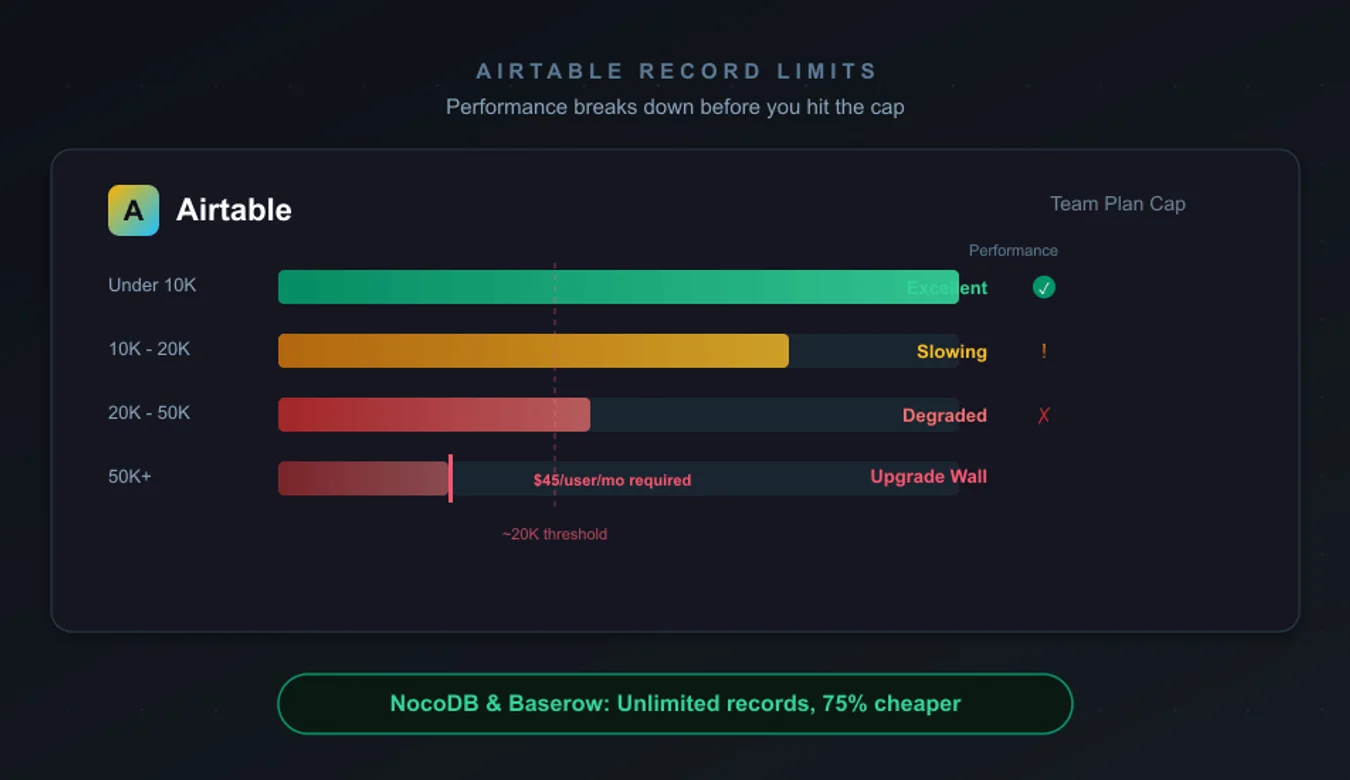
Record limits are one thing. Usable performance is another. Based on user reports and our own testing, here is when Airtable starts struggling:
Under 10,000 records: Airtable works beautifully. Fast loading, responsive views, smooth filtering and sorting. This is the sweet spot where the platform genuinely excels.
10,000 – 20,000 records: Still functional for simple bases with text and number fields. You start noticing slight delays when loading complex views with formula fields and linked records.
20,000 – 50,000 records: This is where things get painful. Formula fields recalculate slowly. Rollups that pull data across linked tables introduce noticeable lag. Mobile performance deteriorates significantly – one user with 44,740 records reported that “searching and scanning a barcode via mobile phone almost halts the app.”
50,000+ records: You need Business ($45/user/month) or higher just to store the data. Performance depends heavily on base complexity. Simple flat tables with basic field types handle it better than heavily linked relational structures with formula chains.
Performance Reality Check
The performance degradation threshold is not 50,000 records – it is roughly 20,000 records when your base uses formula fields, rollups, or linked records across tables. If your base is a simple flat spreadsheet with no formulas, you can push much higher before feeling the slowdown. But most serious Airtable users rely on exactly those relational features.
The HyperDB Illusion
Airtable markets HyperDB as the answer to large-scale data. The pitch sounds impressive: store up to 100 million records in a single HyperDB source. But the reality is far more limited than the marketing suggests.
Here is what Airtable does not emphasize about HyperDB:
- You cannot directly edit HyperDB tables. They are read-only data sources. You can only view and filter synced data in your base.
- Synced subsets are capped at 250,000 records – even though HyperDB stores up to 100 million. You are working with a filtered window, not the full dataset.
- Limited field types: HyperDB only supports text, number, date, and single select. No formulas, no rollups, no linked records, no attachments.
- You cannot change field types after creating a HyperDB table. Get the schema wrong and you start over.
- Enterprise-only pricing. HyperDB is not available on Team or Business plans. You need Enterprise Scale, which means custom pricing and typically a multi-year contract.
HyperDB is useful for specific use cases – large read-only datasets that need a visual interface for filtering and reporting. But it is not a solution for the core problem most users face: working with and editing large datasets in Airtable’s native interface.
The API Rate Limit Nobody Talks About
Every Airtable plan – including Enterprise – caps API access at 5 requests per second per base. You cannot buy more. Personal Access Tokens bump this to 50 requests per second, but that is still a hard ceiling.
Why does this matter? Because each API request handles a maximum of 10 records. At 5 requests per second with 10 records each, you can process 50 records per second. That means syncing 50,000 records takes a minimum of 16 minutes – assuming zero errors and no rate limit retries.
For teams building integrations, automations, or dashboards that pull from Airtable, the API bottleneck often becomes the real scaling limit long before you hit record caps. If your workflow depends on frequent bulk reads or writes, this 5 req/sec wall is more restrictive than the 50,000-record limit.
| API Metric | Limit | Impact |
|---|---|---|
| Requests per second | 5 (all plans) | Cannot be increased at any price |
| Records per request | 10 | 50 records/sec max throughput |
| Rate limit cooldown | 30 seconds | 429 errors stall workflows |
| Free plan API calls | 1,000/month | Reduced from unlimited in Jan 2025 |
What It Actually Costs to Scale Airtable
Airtable’s pricing increased sharply in 2024-2025. The Team plan jumped 67% from $12 to $20/user/month. Business jumped 87.5% from $24 to $45/user/month. These increases hit hardest when you need to upgrade specifically because you hit record limits.
Here is what real teams pay at different sizes:
| Team Size | Team Plan | Business Plan | Upgrade Cost |
|---|---|---|---|
| 5 users | $100/mo | $225/mo | +$1,500/yr |
| 10 users | $200/mo | $450/mo | +$3,000/yr |
| 25 users | $500/mo | $1,125/mo | +$7,500/yr |
| 50 users | $1,000/mo | $2,250/mo | +$15,000/yr |
A 10-person team that outgrows the 50,000-record Team plan pays an additional $3,000 per year just for the privilege of storing more rows. And that does not include the hidden integration costs – teams commonly spend an extra $200-$300/month on Zapier, Make, or portal builders to work around Airtable’s limitations.
For context, a 10-person team on Airtable Business paying $450/month could run ClickUp’s free plan with unlimited tasks and unlimited users – and still have $5,400 per year left over.
Automation Limits – The Other Scaling Wall
Record limits get all the attention, but automation run limits can force upgrades just as quickly.
| Plan | Automation Runs/Month | Synced Tables |
|---|---|---|
| Free | 100 | 0 |
| Team | 25,000 | 10 |
| Business | 100,000 | 20 |
| Enterprise Scale | 500,000 | 20 |
A base with 5 automations running on every record update can burn through 25,000 runs in a month easily if you have active data. Teams using Airtable as a CRM or order management system often hit automation limits before record limits – and the only solution is upgrading to Business at $45/user/month.
Workarounds That Actually Work
Before migrating to another platform, these strategies can extend Airtable’s useful life:
1. Archive old records to separate bases. Move completed orders, closed deals, or historical data to an archive base. Use Airtable Sync to keep a read-only reference accessible from your active base. This is the most effective way to stay under record limits.
2. Replace formula fields with static values. Formula fields recalculate on every load, which kills performance at scale. Set up an automation that calculates the value once and writes it to a plain text or number field instead. This trades real-time calculation for dramatically better performance.
3. Offload attachments to cloud storage. Attachment storage counts against your base limit (1 GB on Free, 20 GB on Team). Upload files to Google Drive, Dropbox, or S3, then paste the share link into Airtable instead. This frees storage and reduces base size.
4. Split bases by time period or department. Instead of one massive base, create quarterly or departmental bases and sync only the data that needs to be shared. This keeps each base well under limits while maintaining cross-base visibility.
5. Delete unused views. Every view – especially filtered and grouped views – adds processing overhead. Clean up views nobody uses. This has a measurable impact on load times for large bases.
When to Migrate Away from Airtable
Workarounds buy time. They do not solve the fundamental problem. Consider migrating if:
- You consistently need more than 100,000 active records that users edit regularly
- Your API integrations hit the 5 req/sec wall and you cannot redesign around it
- Your Airtable bill exceeds $500/month and keeps growing with price increases
- You need real SQL queries, complex joins, or transactional data integrity
- Compliance requirements (HIPAA, SOC 2) demand more control over your data layer
Real companies have made this move successfully. FINN Auto migrated away from Airtable when record limits constrained their auto subscription business. CornerUp’s founder reported a “10x increase in experimentation velocity” after leaving Airtable for a proper database.
Alternatives That Handle 50,000+ Records Better
If you are outgrowing Airtable, here are the realistic options ranked by how well they handle large datasets:
| Platform | Max Records (Paid) | Starting Price | Self-Host | SQL Backend |
|---|---|---|---|---|
| NocoDB | Unlimited (self-host) | Free / $12/seat cloud | Yes | Yes |
| Baserow | Unlimited (self-host) | Free / $5/user cloud | Yes | Yes (Postgres) |
| Airtable | 500K (Enterprise) | $20/user | No | No |
| Smartsheet | 20,000/sheet | $9/user | No | No |
| Notion | No hard cap | $10/user | No | No |
NocoDB is the strongest alternative for teams that need unlimited records. It connects directly to your existing PostgreSQL, MySQL, or SQLite database and layers an Airtable-like interface on top. Self-hosted NocoDB has zero record limits – you are only constrained by your database server’s capacity. The trade-off is no real-time collaboration; users need to refresh to see others’ changes.
Baserow is the best option if you want an Airtable-like experience with real-time collaboration and no record limits on self-hosted deployments. It runs on Postgres under the hood. Cloud pricing starts at just $5/user/month – 75% less than Airtable’s Team plan. The limitation is that you cannot connect it to an existing external database; data must live inside Baserow.
Notion does not enforce hard record caps on paid plans, but performance degrades significantly in the tens of thousands of rows. Synced databases cap at 20,000 rows. Notion is a better all-in-one workspace than a serious database solution.
Smartsheet caps at 20,000 rows per sheet – worse than Airtable’s Team plan. It is only worth considering if you need its project management and Gantt chart features specifically.
Airtable’s Reliability Problem
Scaling concerns go beyond record limits and pricing. Airtable has logged 112 outages since April 2021 – averaging 2 per month. In the last 90 days alone, there have been 4 incidents including 2 major ones, with a median duration of 2 hours and 12 minutes.
For teams running critical business operations on Airtable – inventory management, CRM, order processing – a 2-hour outage is not a minor inconvenience. It is lost revenue and broken workflows. Airtable does not publish formal SLA guarantees for Team or Business plans, which means there is no financial recourse when downtime hits.
Compare this to self-hosted alternatives like NocoDB or Baserow on your own infrastructure, where uptime depends on your hosting provider’s SLA – typically 99.9% or better on services like Render or AWS.
Privacy and Terms Analysis
CriticNest reads the fine print so you do not have to.
Airtable’s terms of service include standard cloud SaaS data handling, but there are details worth noting. Airtable retains the right to access your data for service improvement and troubleshooting purposes. Your data is stored on AWS infrastructure, primarily in US data centers. There is no option to choose your data region on Team or Business plans – EU data residency requires Enterprise.
For teams handling sensitive data – customer PII, healthcare records, financial information – Airtable’s lack of regional data controls below Enterprise and absence of HIPAA compliance on standard plans is a real concern. Self-hosted alternatives (NocoDB, Baserow) give you complete control over where your data lives and who can access it.
Airtable also changed their refund policy in October 2025, eliminating prorated refunds for mid-cycle seat removals. If someone leaves your team mid-month, you pay for the full billing period. This is a minor but frustrating change that signals a company prioritizing revenue extraction over customer goodwill.
Pros and Cons of Airtable at Scale
Pros
- ✓ Best-in-class UI for non-technical users
- ✓ Rich field types (attachments, lookups, formulas)
- ✓ Real-time collaboration works seamlessly
- ✓ Built-in automations and integrations
- ✓ HyperDB for read-only large datasets
- ✓ Excellent under 20,000 records
Cons
- ✗ Performance degrades past 20K records with formulas
- ✗ API capped at 5 req/sec on all plans
- ✗ 67-87% price increases in 2024-2025
- ✗ 112 outages since 2021 (2/month avg)
- ✗ HyperDB is read-only with limited field types
- ✗ No self-hosting or data region control below Enterprise
Frequently Asked Questions
Can Airtable handle 100,000 records?
Yes, on the Business plan ($45/user/month) which allows 125,000 records per base. However, individual tables are capped at 100,000 records regardless of plan. Performance with 100,000 records depends heavily on base complexity – simple flat tables work, but heavy use of formulas and linked records causes noticeable slowdowns.
What happens when you hit Airtable’s record limit?
Airtable blocks you from adding new records once you reach your plan’s limit. You receive an “over record limits” warning. Existing records remain accessible, but you cannot create new ones until you delete records, archive data to another base, or upgrade your plan.
Is Airtable good for large databases?
No. Airtable works best as a collaborative spreadsheet-database hybrid for datasets under 20,000 records. For large databases exceeding 50,000 records, self-hosted alternatives like NocoDB or Baserow offer unlimited records with better performance at lower cost.
How much does Airtable cost for 50,000 records?
The Team plan at $20/user/month supports up to 50,000 records per base. For a 10-person team, that is $200/month or $2,400/year. If you exceed 50,000 records, you must upgrade to Business at $45/user/month – $450/month for 10 users.
What is Airtable’s per-table record limit?
Every table in Airtable is capped at 100,000 records regardless of your plan. This is separate from the per-base limit. Even Enterprise Scale with its 500,000-record base limit cannot have a single table exceed 100,000 rows.
Does Airtable HyperDB solve the record limit problem?
Partially. HyperDB stores up to 100 million records but only syncs 250,000 at a time to your working base. HyperDB tables are read-only, support limited field types (text, number, date, single select only), and require Enterprise pricing. It is useful for reporting on large datasets, not for actively editing them.
What is the best Airtable alternative for large datasets?
NocoDB (self-hosted) for unlimited records with SQL database access, or Baserow for the closest Airtable-like experience with real-time collaboration. Both are open-source with free self-hosted options and dramatically lower cloud pricing than Airtable.
Can I use Airtable’s API to work around record limits?
No. The API is capped at 5 requests per second on all plans, processing a maximum of 50 records per second. This makes bulk operations slow and prevents workarounds that rely on rapidly cycling through large datasets. The API limitation often becomes the real bottleneck before record limits do.
Why is Airtable so expensive compared to alternatives?
Airtable’s Team plan costs $20/user/month vs Baserow’s $5/user/month for more records. The premium reflects Airtable’s polished UI, built-in automations, and extensive integration ecosystem. Whether that premium is worth 4x the price depends on how much your team values those features vs raw capacity.
Should I migrate away from Airtable?
Migrate if you consistently exceed 50,000 active records, hit API rate limits regularly, or spend more than $500/month on Airtable plus integration tools. Stay if your dataset is under 20,000 records, your team relies on Airtable’s UI and automations, and performance is acceptable.
Final Verdict
Airtable can handle more than 50,000 records on paper. In practice, performance starts degrading well before that threshold, and the cost to scale is steep – especially after the 2024-2025 price hikes.
For teams under 20,000 records with moderate complexity, Airtable remains an excellent tool. The UI is unmatched, real-time collaboration is seamless, and the automation ecosystem is mature. But once you cross the 50,000-record line, you are paying premium prices for a platform that was not designed to be a database.
The honest recommendation: use Airtable for what it does best – collaborative data management at small to medium scale. When your data outgrows it, migrate to NocoDB or Baserow rather than paying increasingly higher prices for increasingly worse performance. The 50,000-record wall is not just a pricing limit. It is a signal that your data has outgrown the tool.